
Serif Affinity Photo

- Windows 7, 8, 10, 11
- Version: 2.6.5.3782
- Size: 726MB
- Click to rate this post![Total: 1 Average: 5]You must sign in to vote


- License Type: Full_Version
Serif Affinity Photo may have less features than Adobe Photoshop, but it doesn’t make the software less useful. It provides a wide range of tools that most photographers need. It is powerful yet demands less hardware resource and, most important of all, it is cheaper. For users who give up on Adobe Photoshop because of the price or hardware requirements, Serif Affinity Photo is a saviour.
Serif Affinity Photo has been developed for Windows since 2015, but its history as a photo editing software has actually been started from 2009. It supports non-destructive editing, batch processing, unlimited layers, raw editing, and Adobe’s PSD as well as other common file formats.
Features and Highlights
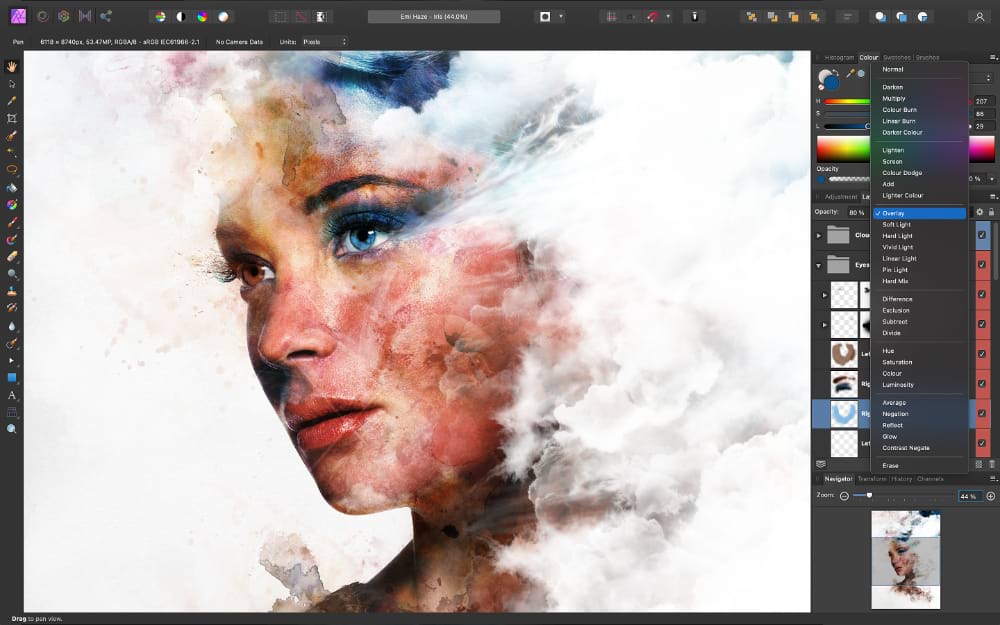
As mentioned before, Serif Affinity Photo supports batch processing. It means that you can work with a large collection of photos efficiently. It saves time a lot since you do not have to repeat the same editing processes over and over again for every single photo.
Serif Affinity Photo offers an uncluttered user interface. Users who aren’t familiar with it yet should be able to adapt to it quickly, thanks to the clean layout, the visual references, and dozens of tutorial videos that anyone can watch for free. The layout is also customizable so users can adjust it to do things faster and easier.
In other photo editing software, you will find modes. In Serif Affinity Photo, those modes are called Personas, each of which provides a different environment optimized for specific tasks. You can switch between Personas easily according to your need.
There is Photo Persona for general photo editing, Liquify Persona for retouching, Develop Persona for RAW image development, Tone Mapping Persona for providing an environment exclusively designed for image tone mapping, Export Persona to save the output in any of the supported file formats, and Panorama Persona for editing stitched photos.
In addition to the Persona Toolbar that hosts all the Personas, you will find Context Toolbar in Serif Affinity Photo. It is the kind of toolbar that appears when you select a tool. The options and commands in the toolbar changes according to the currently selected tool, the active Persona, or the selection type.
In Serif Affinity Photo, you can stitch images to create a wider scene. It provides a dedicated toolset for fine tuning panorama images. How long it takes to produce a panorama depends on the number of photos and the complexity. To get the best result, make sure to avoid blurry subjects during the shoots.
Serif Affinity Photo Free Download for Windows
Serif Affinity Photo is a perfect choice for everyone who needs a powerful yet affordable photo editing software. Furthermore, its hardware requirements are not as demanding as Adobe Photoshop. While the latter requires at least 8 GB of RAM and 4 GB of free hard disk space, Serif Affinity Photo can run on an older computer supported by 2 GB of RAM and less than 1 GB of free hard disk space. You can click the link below to download Serif Affinity Photo for Windows:
- App Name Serif Affinity Photo
- License Full_Version
- Publisher Serif
- Updated May 9, 2026
- Version 2.6.5.3782
Anturis.com is your trusted source for software downloads.















Leave a Comment