
Microsoft Activation Scripts

- Windows 7, 8, 10, 11
- Version: 3.11
- Size: 449KB
- Click to rate this post![Total: 1 Average: 5]You must sign in to vote


Many believe that Microsoft Activation Scripts is the best at what it does compared to the popular alternatives. It offers five simple activation methods to choose from, each of which is easy to follow. And most importantly, they work.
It’s an open source portable program to boot. Everyone hesitating to use it can view the source code to find out if it does something else other than letting users activate Microsoft products in the most effortless way possible.
Features and Highlights
Use PowerShell or Command Prompt
With Microsoft Activation Scripts, you can activate Windows and Office using PowerShell, but this method is only intended for Windows 8 and later. It works by using the IRM command to download a script, which is later executed by the IEX command.
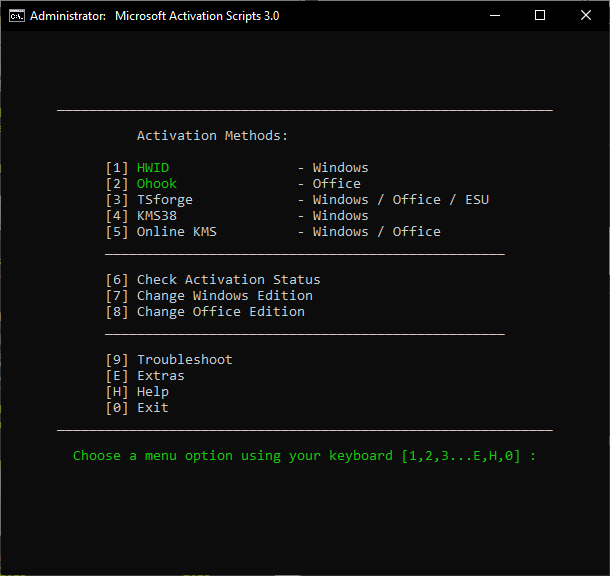
The second method, which supports Windows 7 and later, requires you to use the command prompt to run a script file called MAS_AIO.cmd. Once it opens, you’ll see the activation methods along with a few options which may come in handy depending on your circumstances.
Microsoft Activation Methods
Despite there are five activation methods—which include HWID, Ohook, TSforge, KMS38, and Online KMS—users are recommended to use HWID to activate Windows 10 and 11.
The HWID activation, which requires internet connectivity to run, can be linked to your Microsoft account and is permanent as long as the hardware doesn’t change significantly. Swapping the motherboard, for example, may deactivate the system. If this happens, you’ll have to run the script again to perform another activation.
TSforge, while it can also activate Windows permanently, is less reliable for Windows 10 and Windows 11 because the activation cannot survive major feature upgrades and Windows reinstalls.
For activating Office, the recommended method is Ohook, which supports all Office version on Windows 8 and higher. The activation is permanent. Even if you repair or update Office, the activation remains valid. It can also survive Windows major feature upgrades.
Ohook doesn’t require internet connection. It works by placing a custom SPPC.dll file, which is open source, in the Office folder. It doesn’t modify the system’s SPCC.dll file located in C:\Windows\System32.
Change Windows Edition
The free tool also has an option to change Windows edition. After you select the option, you’ll see a list of Windows editions based on your existing version.
If you use Windows Professional, you may see suggestions such as Windows Professional Education, Professional Workstation, Education, Professional Single Language, Server RDSH, IoT Enterprise, and Enterprise.
Microsoft Activation Scripts Free Download for Windows
With Microsoft Activation Scripts, you can also modify your Office edition, like removing the applications you don’t need anymore, or change its update channel to Monthly Preview, Monthly Enterprise, Insider Fast, Semi Annual Preview, Perpetual2024, and Semi Annual, among others.
All in all, its ease of use in bypassing the licensing problem, its flexibility in modifying current Windows and Office editions, and the fact that it is an open source that has been well received, are what make the free tool appealing. You can click the link below to download Microsoft Activation Scripts for Windows:
- App Name Microsoft Activation Scripts
- License Freeware
- Publisher MASSGRAVE
- Updated May 9, 2026
- Version 3.11
Anturis.com is your trusted source for software downloads.














Leave a Comment