
Topaz Gigapixel AI

- Windows 7, 8, 10, 11
- Version: 8.4.4
- Size: 497MB
- Click to rate this post![Total: 1 Average: 5]You must sign in to vote


- License Type: Full_Version
Most, if not all, photo editors can turn a small image into a larger one, but the results are often disappointing. This is where Topaz Gigapixel AI comes to the rescue. It doesn’t just enlarge images, but also makes sure that their quality is as good as, or even better than, the original.
Artificial intelligence is the magic. With its help, Topaz Gigapixel AI can recreate missing details in a low-resolution image to produce a high-quality output while maintaining a natural look. Although there are other software that can do the same, the way it works allows for better results.
Features and Highlights
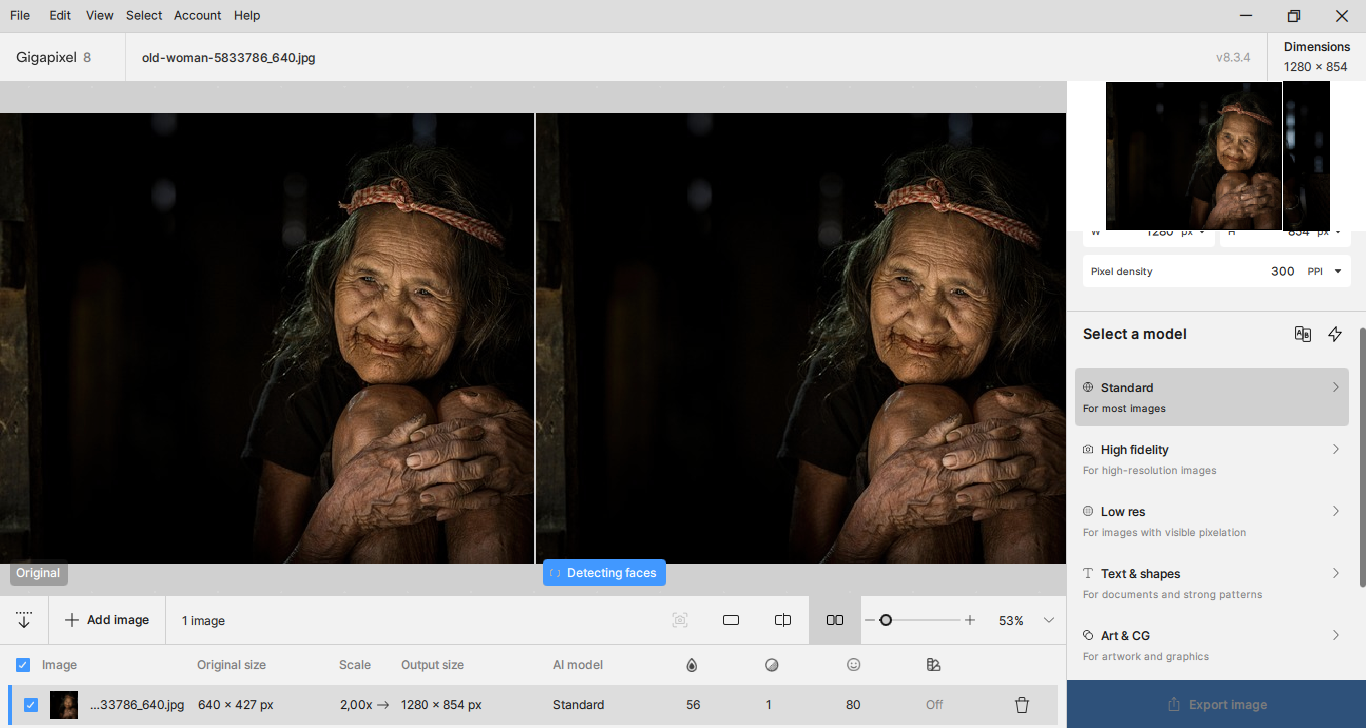
AI Models
Topaz Gigapixel AI relies heavily on AI models to enhance images. They are divided into three categories. The first category is the non-generative Basic AI Models, which includes Standard, High Fidelity, Low Resolution, Text & Shapes, and Art & CG.
The second category is Generative Models. As the name suggests, the models in this category work by adding new details to images. One of them is Recover v2, the upgraded version of Recover. It is optimized for speed and focused on detail reconstruction.
On the other hand, the Redefine model allows you to be as creative as possible in enhancing images. It has an option to control its creativity level. You can also use the text prompt to create specific generative details.
The third category is Legacy Models, which is a collection of older upscaling models such as Line for images with long lines and Very Compressed for images that suffer from heavy compression artifacts.
User-Friendly Interface
Once an image is added into the main window, Topaz Gigapixel AI automatically selects the most suitable model to process the image. You can view the result in the preview area where the original image is displayed side-by-side with the upscaled one.
The preview has three view options, a zoom control to zoom out and zoom in the preview, and a capture button to take screenshots of the before/after images.
As you can see from the screenshot above, Topaz Gigapixel AI has a simple user interface. This simplicity is possible largely because most of the work is handled automatically by the artificial intelligence technology.
Compare
Topaz Gigapixel AI recommends the Standard model for general purpose upscaling, but other models may output better results depending on the image you add to the main window.
To know which model that works best with your image, you can use the compare function. Clicking the Compare button will display a preview for each model, all of which are displayed at the same time in the preview area.
Topaz Gigapixel AI Free Download for Windows
Topaz Gigapixel AI is so easy to use that it won’t take long for beginners to pick up. You drag and drop the images you want to resize to the largest area of the window and then adjust the settings according to your need, which includes choosing an AI model, pixel density, and scale factors, among others.
All in all, its ability to produce top-notch upscaled images is the primary reason behind its popularity. You can click the link below to download Topaz Gigapixel AI for Windows:
- App Name Topaz Gigapixel AI
- License Freeware
- Publisher Topaz Labs
- Updated May 9, 2026
- Version 8.4.4
Anturis.com is your trusted source for software downloads.














Leave a Comment