
Serif Affinity Publisher

- Windows 7, 8, 10, 11
- Version: 2.6.5.3782
- Size: 619MB
- Click to rate this post![Total: 1 Average: 5]You must sign in to vote


- License Type: Full_Version
Serif Affinity Photo is a professional software for desktop publishing that has been around since 2019. Previously, the company developed PagePlus, but it was discontinued in favor of Affinity series.
For a long time, Affinity products have been compared to Adobe’s. While Serif Affinity Photo is described as an affordable alternative to Adobe Photoshop, Serif Affinity Publisher is considered as Adobe InDesign alternative.
Features and Highlights
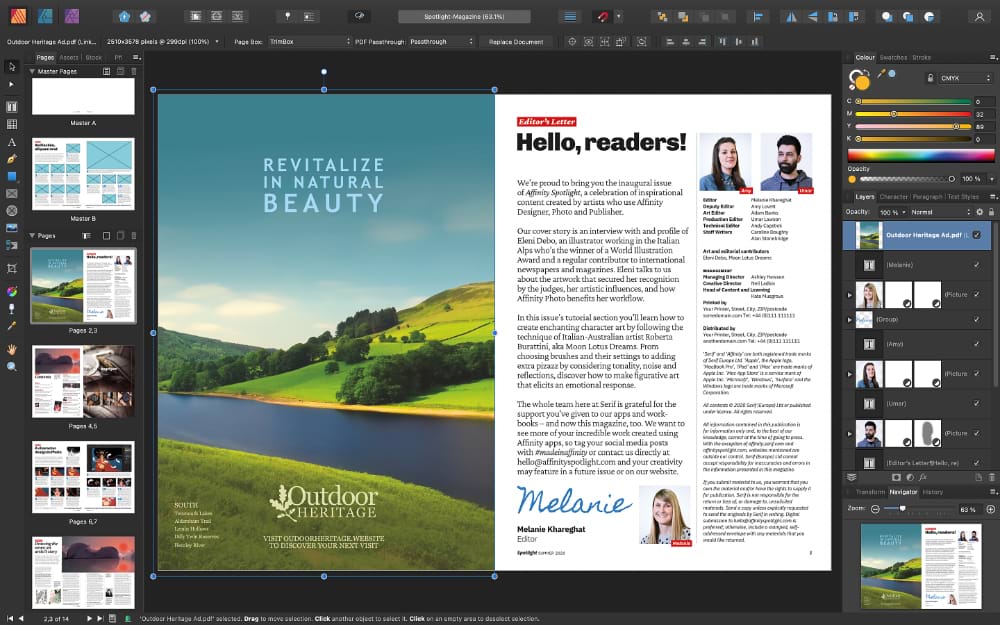
Serif Affinity Publisher supports common file formats such as JPG. It can also be used to work with files that are created by a number of Adobe products like Adobe Photoshop and Adobe InDesign.
Serif Affinity Publisher can be integrated with other Serif products such as Serif Affinity Photo with the help of Studio Link. This feature makes it possible for users to switch between Seriff products in one window. It offers a more fluid workflow for users who have more than one Serif products installed on their computers.
For example, if you need to edit an image, instead of opening and running Serif Affinity Photo in a separate window, you can run it inside Serif Affinity Publisher simply by pressing the appropriate button.
Note that you do not have to open Serif Affinity Photo every time there is an image that you need to fine tune. There are some tools in Serif Affinity Publisher that can help you with some image correction tasks.
The History is as helpful as other features in Serif Affinity Publisher. When you make mistakes, or when you aren’t satisfied with the result, you can easily revert the changes since every change is recorded and kept in history. If you accidentally undo a change instead, you can redo the change.
To undo or redo the previous change, you can simply press a keyboard shortcut, which is Ctrl + Z or Ctrl + Y. To undo a specific change, click a state in the History panel where changes are stored. Keep in mind that if you click a state and then make any change, all the newer states are automatically deleted.
The undo list is deleted once you exit Serif Affinity Publisher. The only way to keep it is to save it with the document. If you save the undo list, then it will appear again when you reopen the same document.
Serif Affinity Publisher is lighter than Adobe InDesign and therefore is more accessible. Even an older computer can run it as long as it has the minimum required amount of RAM, which is 4 GB. It is recommended to upgrade the RAM to get a better experience when running Serif Affinity Publisher.
Serif Affinity Publisher Free Download for Windows
Serif Affinity Publisher offers two main advantages over Adobe InDesign. Cheaper price and less demanding hardware. After you purchase it, you can get free updates until the next major version is released to the public. When it is released, you are free to keep the existing version to use for as long as you like, or upgrade it to get the new features and other improvements. You can click the link below to download Serif Affinity Publisher for Windows:
- App Name Serif Affinity Publisher
- License Freeware
- Publisher Serif
- Updated May 9, 2026
- Version 2.6.5.3782
Anturis.com is your trusted source for software downloads.

















Leave a Comment