
Nuance Dragon Professional

- Windows 7, 8, 10, 11
- Version: 16.10.200.044
- Size: 3.8GB
- Click to rate this post![Total: 1 Average: 5]You must sign in to vote


- License Type: Full_Version
Nuance Dragon lets you do many things on your PC by voice commands. It is a well-known speech recognition solution that works on different platforms, including Windows PC. The voice recognition system that becomes the core of all Dragon software had been developed far back in 1975 by Dr. James Baker and Dr. Janet M. Baker.
You can use Nuance Dragon to dictate a very lengthy document, but dictating documents is not the only thing that Nuance Dragon is capable of. It can be used to launch and close any application, transcribe audio recording, and more.
Features and Highlights
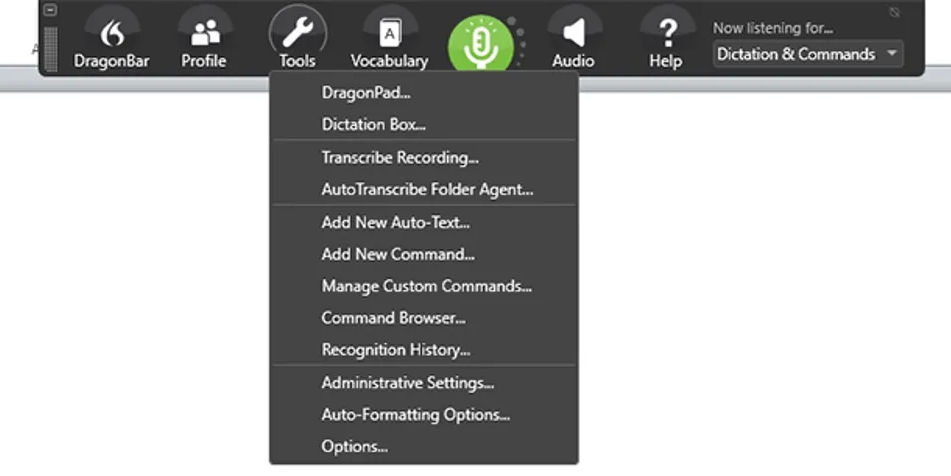
With Nuance Dragon, you can open Microsoft Word by voice instead of mouse and then dictate the text, and see the text appears on the page. There is no need to type anything when you create a new document or edit an existing one. A word can even be underlined by saying the appropriate command. For users who cannot type fast, this is a terrific solution.
At the beginning, sometimes you will probably forget some commands when you use Nuance Dragon. The company has anticipated such a situation and therefore prepare an easy way to deal with it. You just need to ask and the software will give you the answer.
Nuance Dragon can also be used to open a web browser. There are dozens of voice commands that you can use to control the browser such as opening a new tab in a new window, close the current tab, go to the last tab, and bookmark all tabs.
Voice commands to navigate the web are also available. They allow you to refresh a page, click a button, scroll down a page, visit a website, use the default search engine to search the web, search a specific site, and many more.
While the voice commands to browse the web and control the browser sounds nice, keep in mind that Nuance Dragon only supports Internet Explorer 9, 10, and 11, and the latest version of Google Chrome. It may not work on other Chromium-based browsers such as Vivaldi, Opera, Brave, and Microsoft Edge.
To be able to fully use the voice commands to operate Google Chrome, there is an official extension that needs to be installed.
The ability of Nuance Dragon to transcribe audio recording means that you just need to sit back and let the software types everything for you. However, the result can be unexpected. When it was used to transcribe a recording on a test, the output was a wall of text with no paraprah break so it had to be edited. On top of that, when the transcription is running, the software cannot be used to dictate documents.
Nuance Dragon Free Download for Windows
Using Nuance Dragon for control might feel weird at first but you will get used to it over time. Since it is highly customized, it should be easier for you to adapt to it, not to mention that it is powered by Deep Learning technology which enables the software to become smarter the more you use it. You can click the link below to download Nuance Dragon for Windows:
- App Name Nuance Dragon
- License Full_Version
- Publisher Nuance Communications Inc
- Updated May 9, 2026
- Version 16.10.200.044
Anturis.com is your trusted source for software downloads.















Leave a Comment