
Epson L5296 Driver
- Windows 7, 8, 10, 11
- Version: -
- Size: 33MB
- Click to rate this post![Total: 1 Average: 5]You must sign in to vote


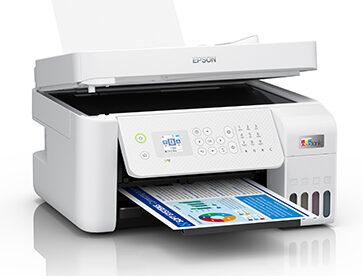
The Epson EcoTank L5296 is a highly advanced multi-purpose printing solution that is capable of providing high-quality services to challenging home offices and small business settings. With an elegant design and a smaller size, this printer can fit any workspace without compromising performance. It is also a huge advancement in efficiency with Epson famous Heat-Free Technology used to provide high-quality prints, but with low power consumption than the standard laser printers, therefore, making it not only a cost-effective and ecologically aware decision.
On top of the basic printing functions, L5296 is a capable and multitasking powerhouse, providing scanning, copying, and faxing options, all of which are available in an intuitive interface. Its integrated ink tank system is designed to hold large quantities of ink and is designed to refill mess-free, which has a significant benefit of saving money per page and minimizing the number of times that it has to be serviced. Ensuring that users are capable of being productive anywhere in the office, this printer has strong connectivity options in the form of Wi-Fi Direct and Ethernet, making it a reliable and professional document management experience.
Features and Highlights
Exceptional Printing Efficiency
The Epson L5296 is powered by a high-end PrecisionCore technology, which provides high quality text and bright images that are sharp and crisp at a high speed. This efficiency also means that the large volume print jobs are accomplished fast, so that the businesses can have a consistent workflow without having to be frustrated by having to wait a long time before their print job is finished, or by having to constantly halt the mechanism in operation.
The printer has Heat-Free Technology thus consuming less energy, compared to its competitors, which lowers the overall cost of operation. This aspect does not just reduce the amount of electricity consumed but also reduces wear and tear of internal parts thereby increasing the life of the device and ensuring better performance with time.
Ink Tank System
Another impressive feature of this model is the inbuilt ink tank system, which avoids the use of costly and wasteful cartridges. The tanks are front loaded and as a result, you can easily monitor the level of ink and as such, you are never caught in the middle of a crucial project.
The bottlenecks used have unique key numbers that fit into the tanks of the corresponding colors, making the spill-free refilling process easy. This design ensures easy maintenance and cleanliness, which offers high page yield which can be in the range of thousands of pages per set of ink bottles, thus greatly reducing the overall cost of ownership.
Seamless Wireless Connectivity
In the current mobile-driven world, the L5296 is the most flexible with the inbuilt Wi-Fi and Wi-Fi direct. The Epson Smart Panel app allows users to easily print documents via smartphones, tablet computers, or laptops and the app makes it easy to set up and offer a friendly interface to control the different print functions of the printer.
Its versatility is further improved by the addition of an Ethernet port and it can be used to provide stable and secure wired networking in an office setting. The support of multiple devices makes sure that all team members will easily access the capabilities of the printer, which will contribute to a more collaborative and efficient digital working environment of all people involved.
Automatic Document Feeder (ADF)
The printer has an Automatic Document Feeder, 30 sheets in size, which is a game changer to the business that deals with multi-page documents. This attribute enables the scanning, copying, and faxing of large piles of documents without using their hands, thereby saving them a lot of time that would be wasted in manually inserting each page in the flatbed.
This simplified operation makes it more productive as users can work on other duties whilst the printer does the heavy-lifting. ADF is built with reliability and precision so that all pages are fed properly and are processed at high resolution so that the integrity of your professional documents is preserved.
Vibrant 1.44″ Color LCD
The available 1.44-inch color LCD screen just makes it incredibly easy to navigate the different functions of the Epson L5296. This well-lit and full-color interface offers a very simple menu system, enabling the user to adjust settings, monitor printer status, and perform maintenance without the need to have a computer connection.
The user-friendly control panel minimizes learning curve of a new user and this aspect is easy to use by all office occupants. Be it when changing copy settings or configuring a fax, the LCD display provides visual feedback that makes sure that all actions are carried out correctly and with minimal effort.
High-Quality Borderless Printing
The L5296 can print up to 4R size in borderless printing, which is suitable to those who require creating marketing materials or professional photographs. This can be used to produce a dramatic, edge-to-edge visual that appears professional and refined, ideal in brochures, flyers or internal presentations that demand a high visual appeal.
High quality dye inks used by the printer give smooth gradations and precise colors, so that all prints can be of high professional quality. This is an added advantage to the machine that makes it more than a printer of a document, but a creative device to many business requirements.
Pros
- Incredibly low price per page courtesy of the EcoTank system.
- Heat-Free Technology saves energy and carbon footprint.
- Multifunction 4-in-1 with print scan copy and fax.
- Small and sleek design that fits in tight workstations.
- Easy mobile printing using the Epson Smart Panel app.
- Ink bottles of high yield included with the original purchase.
Cons
- Costs more than most automobile based printers.
- No automatic duplex printing of two sided documents.
- The 1.44 inch screen may not suffice to some users.
- Very high volumes are somewhat limited by the capacity of paper tray.
- High-resolution photos may have a rather slow print speed.
- Lacks front USB to print directly to a thumb drive.
Download Epson L5296 Driver for Windows
Epson EcoTank L5296 is one of the best options offering professionals with long-term advantages and flexibility. Although the absence of automatic duplexing may be a disadvantage to some, its amazing ink economy, strong wireless capability and the convenience of an ADF make it a powerhouse in any small office. It is able to strike the right balance between quality production and low cost of operation, keeping your business productive and professional. You can click the link below to Download L5296 Driver for Windows:
- App Name Epson L5296 Driver
- License Freeware
- Publisher Seiko Epson
- Updated Apr 17, 2026
- Version -
Anturis.com is your trusted source for software downloads.













Leave a Comment