
Epson SX235 Driver

- Windows 7, 8, 10, 11
- Version: -
- Size: 26MB
- Click to rate this post![Total: 1 Average: 5]You must sign in to vote


Epson Stylus SX235 is a masterpiece of effective engineering with a purpose of serving home users and provide the balance between the high quality of the output and the small size of footprint. Being the device of the Epson Small-in-One series, the device removes all of the bulk of the more traditional multifunction printers without skimping on the features required in day-to-day use. You can print colorful school projects or scan sensitive administrative reports, the SX235 is the same reliable printer that produces outstanding clarity.
In addition to physical design, SX235 is hailed as user-friendly with regard to modern connectivity and cost control. With a combination of wireless features into an entry level model, Epson has taken the step to make sure that users are not constrained by their cables to print anywhere in the home. This printer is not merely a peripheral, it is an intelligent investment to those who appreciate the space saving designs with the powerful output that is that of the Epson Micro Piezo print head technology.
Features and Highlights
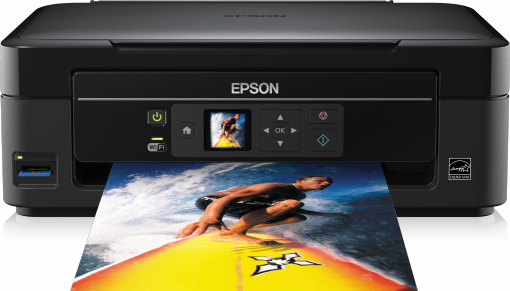
Compact Small-in-One Design
The Epson SX235 boasts of a very sleek and compact profile, and is one of the smallest multifunction printers in its category. Its philosophy of Small-in-One means that it can fit on small bookshelves or cramped desks. This intelligent design allows the homeowner to keep their place clean and have access to powerful tools as well.
The construction is very strong and solid despite its small size, and can be used in the domestic environment over an extended period. The stylish matte finish and recessed paper trays ensure that the device looks modern and unobtrusive in any room. It is the ideal option to users who require a scanner and copier but do not have the space.
Individual Ink Cartridge System
The use of individual ink cartridges is one of the greatest merits of SX235. This system also lets you replace a single color instead of completely replacing the tri-color cartridges when that color runs out such as in case you need a different color. This efficiency will save you a lot of money in the long run as a lot of wasted ink is eliminated.
With the help of the DURABrite Ultra Ink created by Epson, the printer creates smudge-proof and waterproof prints that can last several years. It is a high quality pigment ink that makes text laser-sharp, and photos bright. It offers a professional finish to all types of media, plain office paper to glossy photo sheets in albums.
High-Speed Wireless Connectivity
The Wi-Fi technology incorporated in the SX235 enables several users to easily connect to the gadget without the obtrusive USB cables. The wireless connection is easy to establish and it therefore allows free printing of laptops and computers situated all over the house. This aspect increases productivity since it provides flexibility in workstation locations.
Moreover, the wireless feature promotes mobile printing, so that the printer does not become obsolete in the mobile-first world. You can also print out documents with low latency through your network connected devices. This connectivity enables the SX235 to be an all-purpose hub to all your digital printing and scanning needs.
Micro Piezo Print Head Technology
The core of the SX235 is the proprietary Micro Piezo technology that guarantees that the location of the ink droplets is accurate in all its jobs. This is a high-end print head that is permanent, compared to other brands where the head is included in the expendable cartridge. This results in increased dependability and reduced maintenance.
It has a maximum resolution of 5760 x 1440 optimized dpi. The degree of detail leads to breathtaking reproduction of photos and very sharp text files. Be it printing high-resolution graphics, or just black-and-white letters, the Micro Piezo engine will ensure a professional-grade output at all times.
Proficient Scanning and Coping
The SX235 has a high quality CIS flatbed scanner that scans fine details at an optical resolution of 1200 dpi. This is perfect in the digitization of old family pictures or scanning of significant contracts to store them in digital form. The colors do not distort the original colors and this offers users excellent digital copies.
Furthermore to scanning, the standalone copying feature is exceptionally user friendly and enables one to make fast duplicates without necessarily firing up a computer. You are able to easily set up black-and-white or color copy directly on the control panel. This is a convenience that is required by busy families that require fast duplicates of IDs or forms.
Energy Efficient Performance
The Epson SX235 has been crafted in a way that is green with an ENERGY STAR qualification of low power consumption. It will consume much less electricity in the printing process than the laser alternatives, and can contribute to reducing your utility bills. This performance is not at the expense of efficiency.
Another feature of the printer is the automatic sleep mode which is activated when the device is not used over some time. This will make sure that all energy is not wasted when the printer is offline. To users that care about the environment, this model is a responsible option that incorporates high-tech capabilities with a reduced carbon footprint.
Pros
- Very small and space-efficient chassis.
- Individual ink cartridge replacement system that is cost-effective.
- Good Wi-Fi connection to print at home.
- Fine output courtesy of Micro Piezo technology.
- Durable and smudge-resistant DURABrite Ultra Ink
- ENERGY STAR certified low power consumption.
Cons
- Less fast printing speed than mid-range models.
- Lacks an LCD display with advanced standalone navigation.
- Two-sided prints do not automatically print in duplex.
- High-volume work has a restriction on paper tray capacity.
- During intensive printing, noise levels may be heard.
- Not equipped with a dedicated memory card slot.
Download Epson SX235 Driver for Windows
The Epson Stylus SX235 is a solid option of people who want to buy a low-cost, all-in-one device and enjoy a low level of home functionality. Its combination of a small form and the affordable individual ink technology with wireless comfort, meets the most universal student and family demands.
Although it might not be an ultra-high-end device with some of the more advanced features such as duplexing or a touch interface, its reliability and print quality render it a very competent companion in daily document and photo handling. You can click the link below to Download SX235 Driver for Windows:
- App Name Epson SX235 Driver
- License Freeware
- Publisher Seiko Epson
- Updated Apr 15, 2026
- Version -
Anturis.com is your trusted source for software downloads.


























Leave a Comment