
Epson L15180 Resetter
- Windows 7, 8, 10, 11
- Version: -
- Size: 5MB
- Click to rate this post![Total: 1 Average: 5]You must sign in to vote


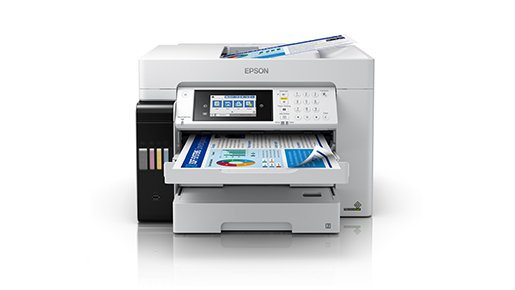
Epson EcoTank Pro L15180 is a powerhouse in the category of A3+ color printers, which are designed uniquely to address the tough needs of the modern, high volume office setting. PrecisionCore Heat-Free technology and a truly sturdy construction make the device a relatively environmentally friendly and highly efficient alternative to regular laser printers without any loss in speed or quality.
The L15180 is designed with businesses in mind that are focused on productivity and costs, offering extremely low printing costs delivering sharp, professional-grade output. With its slim, compact form, it hides the heavy-duty features, which makes it an excellent centerpiece in workgroups which need to integrate seamlessly, have a high capacity to handle paper and a wide range of connectivity to different digital platforms and devices.
Features and Highlights
PrecisionCore Heat-Free Technology
The L15180 has an Epson-developed Heat-Free technology, which eliminates heat usage when ejecting ink. This results in much less power use than laser printers, decreasing the total carbon footprint of the office and monthly energy bills, as well as a shorter first-page-out time on a rush job.
Moreover, the lack of heat implies that fewer spare parts are needed in the life cycle of the printer. The device reduces mechanical wear and tear, thereby ensuring the same print quality even when production is at a high rate. This dependability will make sure that your business runs smoothly without hiccups due to constant maintenance or hardware malfunctions.
A3+ Printing at High-Speed
The L15180 is typified by speed, and can print at a rate of up to 25 ipm, whether in black or color documents. It allows printing in wide-format up to A3+, which means that your staff can create detailed spreadsheets, marketing posters, and architectural plans with astounding clarity and efficiency.
The addition of a high-capacity Automatic Document Feeder (ADF) further improves the workflow by automating the process of scanning and copying of multi-page documents. This will allow employees to concentrate on more important jobs than paper work. The outcome is a lean office environment wherein high volume printing jobs are done in a short period of time.
Outstandingly High Durability and Reliability
The L15180 was designed to accommodate the demands of an active working environment and has a high monthly duty cycle, which guarantees long life. Its durable internal parts are made to be heavily used giving the business confidence that they can count on their printer as a workhorse in the day to day operations of their company to do vital documentation.
In addition to hardware durability, the printer has sophisticated sensors to track ink levels and paper orientation. This proactive structure eliminates typical mistakes and jams prior to their emergence. The long-term cost of repair is reduced by investing in such a long-lasting machine and the investment in the initial office equipment is maximized.
EcoTank Ink System High-Capacity
The new EcoTank system embodies a new cartridge-free system, namely the EcoTank, which uses ink tanks of great capacity, easy to refill and incredibly affordable. A single replacement ink cartridge can print thousands of pages and the cost per print is reduced dramatically and the number of times the supply will need a change to print high volumes is reduced.
This system also helps to reduce environmental waste since it helps to reduce the number of plastic cartridges to landfills. The design of the mess-free, drip-free bottles makes it clear that the process of filling the tanks is not only clean and easy. It is the ideal choice to the companies that are trying to strike the balance between professionalism and sustainability in their operation.
Versatile Connectivity Options
Flexibility is demanded in modern offices and the L15180 provides a full suite of connectivity options such as Wi-Fi, Ethernet and Wi-Fi Direct. It is easy to print documents using smartphones, tablets or laptops, and this means that team members can work together and share documents without taking into consideration how they are physically located within the office.
The printer also offers cloud-based printing and Epson Smart Panel app to manage it intuitively via the mobile device. All these features enable remote monitoring of printer status and ink levels. It can be integrated smoothly with any existing IT infrastructures, which means that it can be used in any digitally-driven workspace or profession.
Professional Quality printing on DURABrite ET Ink.
The L15180 uses the Epson DURABrite ET pigment inks, which are water-resistant, smudge-proof and fade-resistant. This is ideal in business documents that should be readable and professional over a few years such as legal contracts, financial reports, and quality presentations that demand clear text.
The pigment-based ink makes the colors to be vibrant and the blacks deep and bold on plain and specialty paper. This quality of output competes with laser technology and has the advantages of inkjet flexibility. Whether you are sending your documents or not, they will always have an impression of professionalism and attention to detail.
Function of the Epson L15180 Resetter
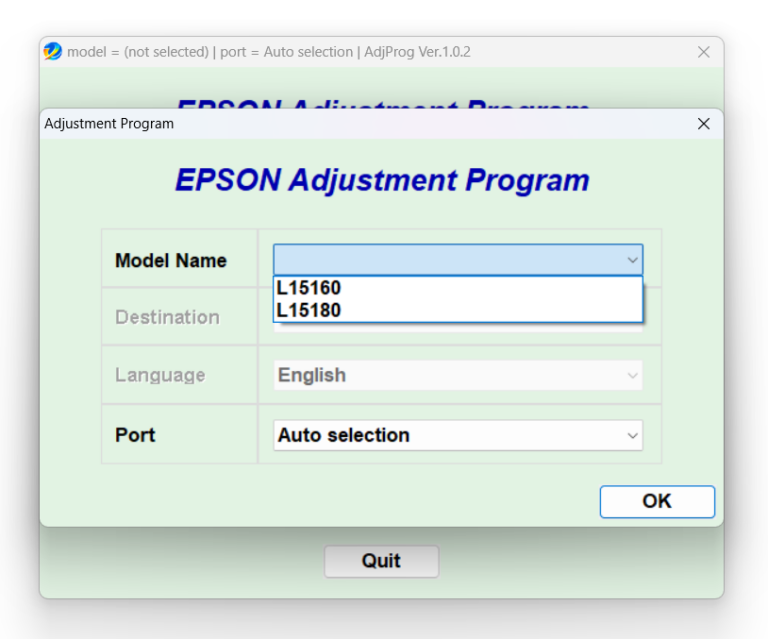
Epson L15180 has an internal pad of waste ink that monitors the amount of excess ink that has been collected during cleaning. When this counter is full, the printer will cease to operate and will show an error of service required to avoid spilling of ink into the hardware of the machine.
With an Epson L15180 Resetter, you can reset this internal counter to 0, which will clear the error message. This product will also be important in the restoration of printer functionality without delay until the arrival of a technician. It also makes sure that your hardware remains running as you take care of the physical maintenance needed.
Download Epson L15180 Resetter for Windows
To sum it up, the Epson L15180 is a better machine, though the resetter software is an essential part of any maintenance of this machine. It offers a fast way out of software-triggered errors, eliminating unnecessary downtime, and enabling you to make the most of the life of the internal parts of your printer when volume printing is needed. You can click the link below to Download L15180 Resetter for Windows:
- App Name Epson L15180 Resetter
- License Freeware
- Publisher Seiko Epson
- Updated Apr 26, 2026
- Version -
Anturis.com is your trusted source for software downloads.


























Leave a Comment