
Epson AL-M320DN Driver

- Windows 7, 8, 10, 11
- Version: AL-M320DN
- Size: 13MB
- Click to rate this post![Total: 2 Average: 5]You must sign in to vote


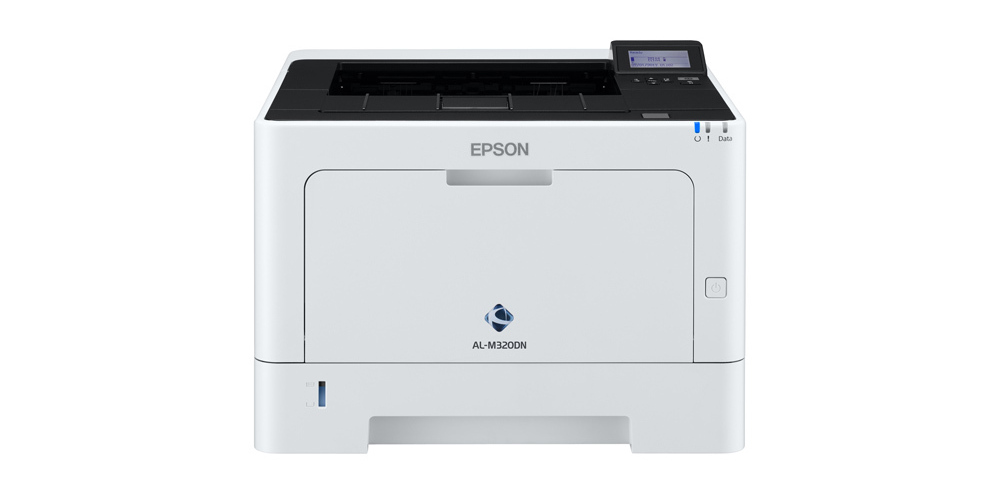
A monochrome printer specializes in black-and-white output, making it an efficient solution for businesses and organizations that mainly produce text-heavy documents such as invoices, forms, and internal reports. Because it uses only black toner, it helps reduce operating costs and simplifies maintenance. The Epson AL-M320DN fits well in this category, combining dependable performance with duplex printing and network connectivity, making it a practical choice for streamlined office workflows.
The Epson AL-M320DN is a laser monochrome printer that comes with optional paper trays, flexible connectivity options, automatic duplexer, a control panel featuring an LCD display, and Epson Connect, among others.
Features and Highlights
Automatic Duplexer
The Epson AL M320DN comes with an auto duplex feature that allows users to print on both sides of the paper automatically, saving time and reducing paper consumption. This function not only supports cost efficiency but also helps create a more environmentally friendly printing process by minimizing waste. With duplex printing handled automatically, users can maintain a professional appearance in documents such as reports, proposals, and manuals without the hassle of manually flipping pages.
Optional Paper Trays
The monochrome printer comes with two paper trays: a paper cassette that can hold up to 250 sheets of paper and an MP tray that holds 100 sheets of paper. As it is made to adapt to growing printing needs in business environments, it also offers extra paper capacity that can hold up to 850 sheets of paper in total.
High Capacity Toner Cartridges
The initial toner cartridge that comes bundled with the printer has a page yield of about 2000 pages. If it runs out, you can replace it with a standard version that gives you a slightly higher page yield of about to 2,700 pages, or a high capacity toner cartridge with a page yield of 6,100 pages, or perhaps an extra high capacity toner cartridge that allows you to print up to 13,300 monochrome pages.
Cost Efficiency
Another key strength of this printer lies in its cost efficiency. By supporting high yield toner cartridges and automatic duplex printing, the Epson AL M320DN helps reduce overall printing expenses while minimizing paper waste. This combination of performance and affordability ensures that users can maintain high productivity without compromising on print quality.
Epson AL-M320DN Driver Free Download
In summary, the Epson AL M320DN stands as a reliable monochrome laser printer designed to meet the needs of both small offices and larger workgroups. With its combination of fast print speeds, consistent output quality, and strong paper handling, it provides a dependable solution for everyday document printing. Its robust design also makes it suitable for environments where durability and efficiency are a priority.
This printer doesn’t just perform well. It’s also designed to save you money. Features like duplex printing and high-capacity toner help cut operational costs over time. By using less paper and making consumables last longer, the Epson AL-M320DN proves to be a cost-effective option that helps businesses stay on top of their expenses. You can click the link below to download Epson AL-M320DN Driver for Windows:
- App Name Epson AL-M320DN Driver
- License Freeware
- Publisher Epson
- Updated Jan 16, 2026
- Version AL-M320DN
Anturis.com is your trusted source for software downloads.







Leave a Comment