
Canon iR-ADV C5235 Driver

- Windows 7, 8, 10, 11
- Version: C5235
- Size: 37MB
- Click to rate this post![Total: 2 Average: 5]You must sign in to vote


The Canon imageRUNNER ADVANCE C5235, abbreviated as Canon iR-ADV C5235, is a floor-standing A3 color multifunction laser printer designed for business and enterprise workflows. It’s fast, produces high-quality prints, and integrates seamlessly with computers and mobile devices.
It’s a high-performance mid-volume device powered by a dual processor system and equipped with Advanced Box, which serves as a built-in document sharing solution. It also connects to Cloud services where users can store and retrieve their documents.
Features and Highlights
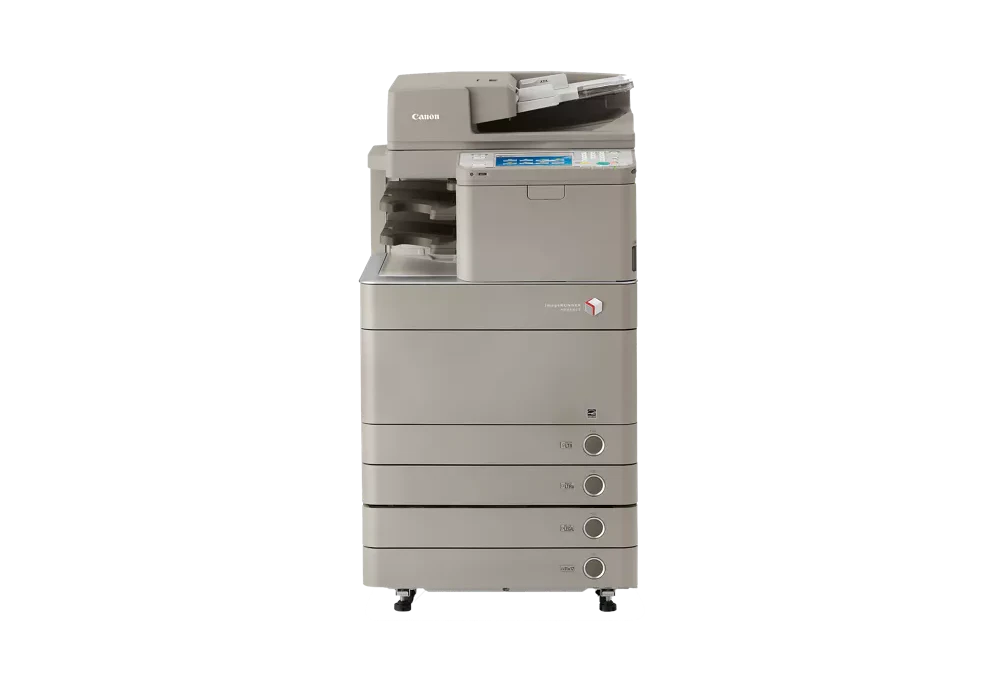
Intuitive Control Panel
The Canon iR-ADV C5235 packs a generous 84-inch full color TFT display, offering high resolution and excellent visibility from multiple angles.
The display features two menus. The Main Menu puts all system functions at your fingertips, letting you adjust how many icons appear, their size, and the background wallpaper. It can even be customized to fit your own preferences or set up to match a group’s workflow.
On the other hand, the Quick Menu is a customizable shortcut to everything you commonly do with the machine. By setting it up to include your most common tasks, you can access them with a single touch.
Printing Without Pause
The business MFP device is designed to let users replace toner cartridges without stopping the printer, thanks to its innovative toner system. When a toner runs low or becomes empty, the printer alerts and shows users which cartridge that needs attention. Users can simply remove the empty cartridge and insert a new one while ongoing print jobs continue in the background.
2-sided Double Pass ADF
Unlike a multi-pass ADF, the Canon iR-ADV C5235’s automatic document feeder can scan both sides of a sheet in a single pass. It can handle up to 100 sheets at a time, from A3 to B6 paper. It copies up to 46 sheets per minute for A4 pages in monochrome or color at 600 dpi. Scanning speed is slightly faster, with 51 sheets per minute at 300 dpi.
Advanced Box
It acts as a networked storage space inside the machine where users can store, manage, and share files directly from the device. Documents that are scanned on the machine or sent from a computer can be saved into the Advanced Box and then accessed by other users on the network or right from the device’s touchscreen. Also, by using Personal Folder, individuals can keep personal files secure while still allowing teams to share folders for group use.
Canon iR-ADV C5235 Driver Free Download
With features such as direct USB access, customizable menus, and options for secure user authentication, the C5235 is designed to improve both productivity and convenience in busy work environments.
This device also goes beyond printing, scanning and copying by offering additional features that support collaboration and secure information management. The Advanced Box allows easy file sharing within the office, while user authentication ensures that sensitive data stays protected.
All of those features are completely available for access after installing the MFP’s driver on your computer. You can click the link below to download Canon iR-ADV C5235 Driver for Windows:
- App Name Canon iR-ADV C5235 Driver
- License Freeware
- Publisher Canon
- Updated Jan 16, 2026
- Version C5235
Anturis.com is your trusted source for software downloads.























Leave a Comment