
Epson WF-3011 Driver

- Windows 7, 8, 10, 11
- Version: WF-3011
- Size: 24MB
- Click to rate this post![Total: 1 Average: 5]You must sign in to vote


It’s great to have a device that can do a couple of things, like a multifunction printer that can copy, scan, and fax files. However, not everyone wants it. Some just need to print files. Buying a multifunction printer that won’t be used beyond printing is a good waste of money. Meet the Epson WF-3011, a printer that does nothing else but printing whatever you want to print.
The top part of the Epson WF-3011 should be enough of a clue to figure out quickly that it is a print-only unit. And it’s also obvious that it isn’t an ink tank printer, since there is no transparent window no matter which angle you look at the printer from.
Features and Highlights
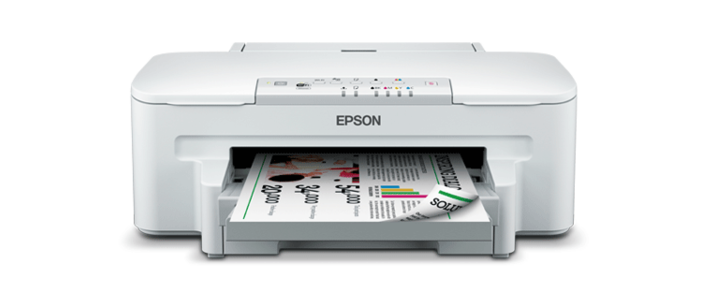
Less Paper With Duplexing
Like ink, paper is a consumable item. You need paper to print. The cost of a single sheet of paper is not as substantial as the cost of ink per page, but it still adds up over time and the total paper cost can get pretty high, especially if you print a lot.
Duplex printing is the solution. By printing on both sides of paper, you can easily reduce paper consumption by half, and the built-in duplexer in the Epson WF-3011 makes it much easier to do it since it takes the hassle of flipping paper. The only downside is you have to wait a bit longer for the print jobs to finish.
Decent Speed and Paper Handling
The Epson WF-3011 prints at approximately 38 A4 pages per minute for monochrome and color printing at economy mode. It’s not the fastest single-function printer, but it’s not that bad either. Overall, it’s a print-only device that’s worth the price.
Paper handling is good for environments where multiple users often print documents. The main paper tray offers a space enough for you to drop up to 250 sheets of A4 plain paper or 20 sheets of glossy photo paper. The rear paper slot can handle one sheet at a time. And the output tray can hold up to 50 pages of A4 plain paper.
Stay Wired or Go Wireless
The Epson WF-3011 offers multiple connectivity options. It supports Ethernet for reliable, wired network connections, making it suitable for shared office environments. Integrated Wi-Fi allows for wireless printing from multiple devices without the need for physical cables. For direct, one-to-one connections, the printer also includes a USB port, which is ideal for connecting to a single computer. These connectivity options make the printer adaptable to different environments and user preferences.
Epson WF-3011 Driver Free Download
The Epson WF-3011 is a cartridge-based printer with a monthly duty cycle of 12000 pages. It also has paper capacity that’s above the average, so the paper tray needs refilling less often. Connectivity is good, with Wi-Fi and Ethernet available as options in addition to the USB cable.
Being a single-function printer doesn’t reduce the importance of a compatible driver software. Without it, the device may not function properly or deliver its full range of features. You can click the link below to download Epson WF-3011 Driver for Windows:
- App Name Epson WF-3011 Driver
- License Freeware
- Publisher Epson
- Updated Jan 16, 2026
- Version WF-3011
Anturis.com is your trusted source for software downloads.




















Leave a Comment