
Canon iR-ADV C5535 Driver
- Windows 7, 8, 10, 11
- Version: C5535
- Size: 71MB
- Click to rate this post![Total: 1 Average: 5]You must sign in to vote


Businesses need the right tools to stay productive. A reliable machine can prevent slowdowns, meet demanding workloads, and deliver satisfactory results that keep projects moving smoothly. The Canon iR-ADV C5535 fits this need perfectly.
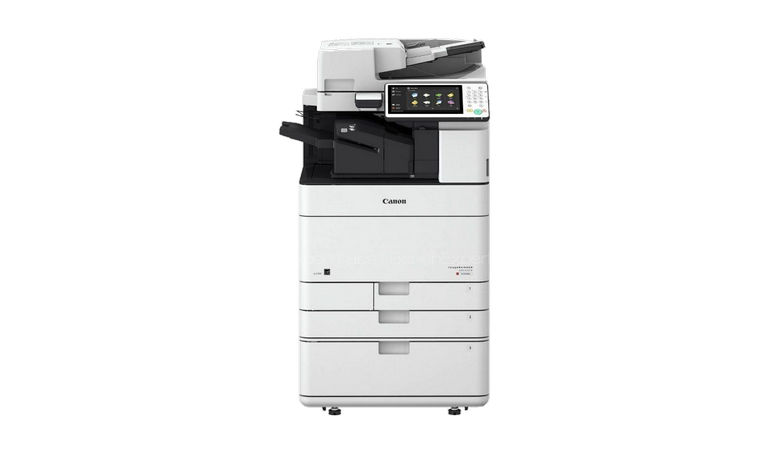
It’s a floor-standing multifunction device built to handle high workloads in busy environments. It supports printing on paper as large as A3, making it suitable for a wide range of projects.
Investing in a machine like this ensures that offices can maintain smooth workflows even during peak periods. With its high paper capacity and robust performance, it is a reliable partner for businesses that need to maintain a high level of productivity.
Features and Highlights
High-Speed Printing for Businesses
In a busy office, every minute counts, and slow printers can hold everything back. The Canon iR-ADV C5535 is designed to handle the demanding workflows of large-scale business operations, offering high-speed printing, seamless document management, and consistent output quality to support productivity and reliability in fast-paced environments.
Extra High Paper Capacity
Out of the box, the C5535 comes with a generous standard paper capacity that can hold over one thousand sheets, split between dual 550-sheet cassettes and a 100-sheet multipurpose tray. This capacity can even be expanded to reduce the frequency of paper refills, allowing the machine to handle more large jobs without interruption.
More Than Printing
The Canon imageRUNNER ADVANCE C5535 is much more than just a printer. It’s a multifunctional powerhouse that seamlessly integrates scanning, copying, printing, and faxing with advanced document management and cloud connectivity. It can lock down print jobs, send scanned documents to Cloud, and distribute scanned documents to multiple destinations efficiently, among others.
It enables users to complete various tasks without having to switch machines. For example, if a user wants to scan files, there is no need to buy a dedicated scanner because the MFP can get the job done quickly.
Store and Share Files
It has built-in storage options like the Mail Box and Advanced Box, allowing users to store and share files directly on the device without needing external servers. Mail Box provides temporary storage to store scanned documents, incoming fax documents, and files that are to be printed later.
Advanced Box offers a more robust solution, functioning as a shared network folder accessible by multiple Canon devices and users. It enables centralized storage, making it easy to save, access, and distribute documents across the office.
Canon iR-ADV C5535 Driver Free Download
The machine, which harnesses the power of laser technology, combines a solid performance of a workhorse and high-quality output with powerful document management capabilities. Its intuitive touchscreen interface, customizable workflows, and strong integration with network and cloud services make everyday tasks faster and more efficient.
While it is an impressive machine, it won’t be able to communicate with a computer without a driver because the devices use different languages. What the driver does is translating computer commands into the printer’s language so that the device knows what to print and how to print it. You can click the link below to download Canon iR-ADV C5535 Driver for Windows:
- App Name Canon iR-ADV C5535 Driver
- License Freeware
- Publisher Canon
- Updated Jan 16, 2026
- Version C5535
Anturis.com is your trusted source for software downloads.




















Leave a Comment