
Canon iR-ADV C3530 Driver

- Windows 7, 8, 10, 11
- Version: C3530
- Size: 33 MB
- Click to rate this post![Total: 2 Average: 5]You must sign in to vote


In a busy office, having a machine that can do many tasks like printing, scanning, and copying helps everything run more smoothly. It saves time, keeps documents safe, and makes it easier for people to do their jobs. A device that is easy to use and connects well with computers and phones also helps teams stay organized and get things done faster. The Canon iR-ADV C3530 offers these benefits and more.
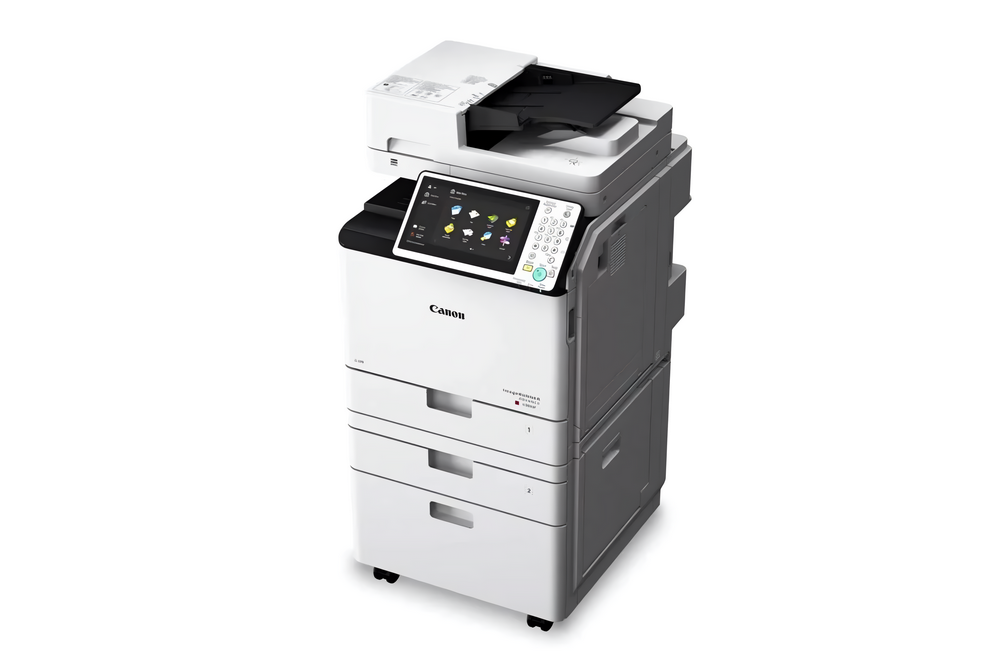
It’s a color laser all-in-one printer with an optional fax. It comes with a 10.1-inch TFT LCD touch display, 250GB hard disk that can be expanded up to 1 TB, 3GB RAM, expandable paper capacity up to 2,300 sheets, automatic document feeder, and automatic duplexer.
Features and Highlights
Double-Sided Printing
The Canon iR-ADV C3530 has a duplexer as part of its standard features. This functionality allows users to print on both sides of a sheet, effectively reducing paper consumption by up to 50% without compromising print quality. It also saves your time because you don’t need to flip the sheets manually as you would with a printer that supports manual duplexing.
Double-Sided Scanning
In addition to single-sided scanning, the machine also supports double-sided scanning. Scan speed for single-sided scanning is 70 ipm for both monochrome and color pages at 300 and 600 dpi. As for double-sided scanning, the speed drops by half but the output quality is still good. Also, even though the speed slows down since the machine has to scan two sides, it still saves time since the whole process runs without manual flipping.
Advanced Box
The Canon iR-ADV C3530 has an internal hard disk that functions as a network file server, allowing users to save, view, and download files from computers, including scanned documents.
It offers two storage locations, each serves a different purpose. Shared Space is the location where users store files for sharing, while Personal Space or Personal Folder is a private storage area that can only be accessed by users who log in with personal authentication.
High Paper Capacity
As a machine designed to support busy workplaces, the Canon iR-ADV C3530 is equipped with a versatile paper handling that accommodates different printing needs. The paper trays can hold a substantial amount of paper. There are three of them, including one multi-purpose tray that can hold 100 sheets and two paper cassettes, each has a capacity of 550 sheets of paper. These paper trays reduce the need to constantly reload paper, which minimizes interruptions during busy work hours and save times.
Canon iR-ADV C3530 Driver Free Download
With its ability to handle a wide range of tasks including printing, scanning, and copying, it ensures that daily operations run efficiently. The device also emphasizes user-friendly operation, making it easier for teams to complete their work without unnecessary complications.
The C3530 is supported by a driver that allows it to communicate properly with a computer. Thanks to the driver, users can send print jobs directly from their computers. They can adjust settings such as paper size, orientation, and print quality, and then send the print jobs to the machine.
You can click the link below to download Canon iR-ADV C3530 Driver for Windows:
- App Name Canon iR-ADV C3530 Driver
- License Freeware
- Publisher Canon
- Updated Jan 16, 2026
- Version C3530
Anturis.com is your trusted source for software downloads.
















Leave a Comment