
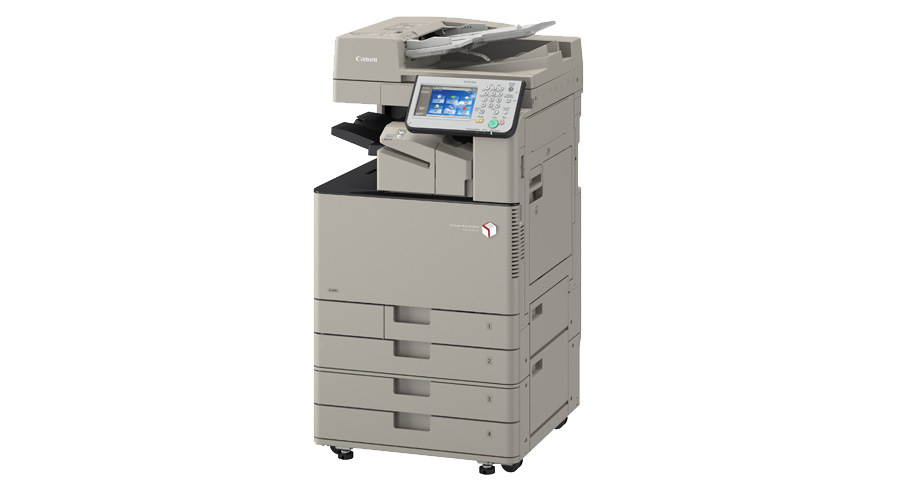
Canon iR-ADV C3330 Driver

- Windows 7, 8, 10, 11
- Version: C3330
- Size: 37MB
- Click to rate this post![Total: 2 Average: 5]You must sign in to vote


Modern offices often require equipment that can handle multiple tasks efficiently while maintaining reliable performance and high quality output. Businesses also look for solutions that save space without compromising productivity and provide user friendly controls for smooth operation. One device that brings these qualities together is the Canon iR ADV C3330.
It’s a floor-standing A3 business workhorse that brings together four core functions in one machine: printing, copying, scanning, and faxing, along with a wide range of appealing options such as Mailbox, Advanced Box, Reminder LED, Staple-on-Demand, and ECO-Staple binding.
Features and Highlights
Multitasking
The Canon iR-ADV C3330 is not just another multifunction device. It is a sophisticated machine that can perform multiple tasks at the same time. For example, you can scan documents right away even when another user is still printing. This flexibility minimizes the queue during busy hours, increasing productivity with barely any effort.
Mailbox
The Mailbox is a storage feature on the C3330’s internal hard drive that lets users save and manage documents directly on the device. Instead of sending a file straight to print, users can store it in their personal or shared mailbox, which acts like a digital folder in the printer that can be accessed from the control panel. From there, the file can be printed later, reprinted multiple times without resending it from a computer, or even combined with other files into a single print job.
Advanced Box
Advanced Box is slightly different from Mailbox. While it also stores and shares documents, it is more like a networked document sharing system. It allows users across a network to store, share, and retrieve files from the printer as if it were a shared folder. The files stored in the machine can be accessed from the control panel, computer, and another imageRUNNER ADVANCED series machine on the network.
Universal Send
It’s a feature that enables users to scan and send documents directly to multiple destinations from the device. The destinations include email addresses, network folders, FTP servers, and USB drives.
It’s designed to simplify document distribution. There are security options such as encryption and digital user signatures to make sure that sensitive documents are protected. Administrators can also register frequently used destinations in the address book, and user authentication can restrict access to authorized personnel.
Document Security
Confidential documents deserve full protection at every step. With Encrypted Print Software, you get the protection. It encrypts data both in transit and while waiting in the print queue. Only users who can authenticate themselves get access to the file and print it.
Canon iR-ADV C3330 Driver Free Download
The C3330 driver is a vital component that allows your computer to communicate seamlessly with the printer, enabling high-quality printing, fast scanning, and access to all of its features.
What it does is establishing connection and translating the data sent back and forth between the devices. When the computer sends an instruction, the driver ensures that the printer can understand it. You can click the link below to download Canon iR-ADV C3330 Driver for Windows:
- App Name Canon iR-ADV C3330 Driver
- License Freeware
- Publisher Canon
- Updated Jan 16, 2026
- Version C3330
Anturis.com is your trusted source for software downloads.























Leave a Comment