
Samsung Xpress SL-M2876ND Driver
- Windows 7, 8, 10, 11
- Version: SL-M2876ND
- Size: 40MB
- Click to rate this post![Total: 2 Average: 5]You must sign in to vote


Monochrome printers remain the go-to option for those who rarely or never print in color. There aren’t as many of them as color printers, but there are enough out there to choose from, each with its own advantages and disadvantages. For anyone needing one with a scanner, the Samsung Xpress SL-M2876ND may offer just enough features for everyday use.
It’s ready for network use, with support for a number of apps and services such as Apple AirPrint, Samsung Cloud Print, and Mopria. Its control panel has a simple LCD screen that shows a maximum of two rows of text, with up to 16 characters per line. More about the 3-in-1 printer can be read below.
Features and Highlights
From Single Sheets to Bulk Scans
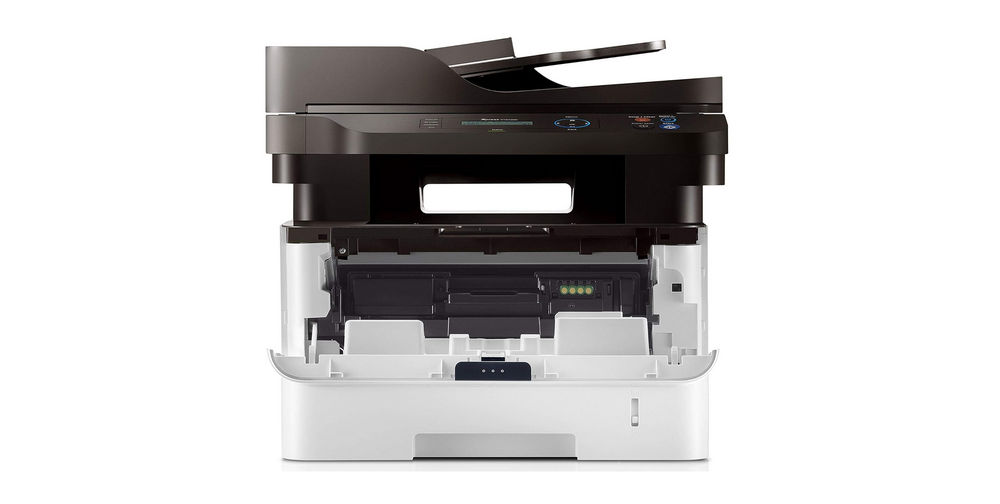
Like other all-in-one printers, the Samsung Xpress SL-M2876ND has a typical 1200dpi flatbed scanner. This is what users usually use when a single sheet needs to be scanned. It’s also perfect for anything else that cannot go through an automatic document feeder without getting damaged in the process.
While the flatbed’s versatility is unmatched when it comes to scanning, the automatic document feeder (ADF) excels at efficiency. It’s especially helpful for scanning many pages since it does the heavy lifting. The sheets do not need to be flipped manually like you would with a flatbed. Its paper capacity is 40 sheets of paper.
Double Sheet Feeders
Most printers only have one paper input tray. It’s usually located at the rear (vertical tray) or in the front of the printers (paper cassette). Some models have more than one, like the Samsung Xpress SL-M2876ND that comes with two input trays, each with a different paper capacity to serve a slightly different purpose.
The main paper tray holds 250 sheets of paper, while the other one, which is a multi-purpose tray, is made to hold only one sheet. The extra tray is mainly for specialty paper, but it can also be used to hold a single sheet of any supported size or type, so you don’t need to swap paper in the main tray.
Simple Way to Save Paper
If you print single-sided pages on 100 sheets of paper, you waste 50 sheets by leaving them blank. On the other hand, if you print double-sided pages, you’ll only need 50 sheets of paper to print 100 pages.
With printers that don’t have an automatic duplexer, double-sided printing can only be done manually and it can be a hassle. With the Samsung Xpress SL-M2876ND, it’s much easier since the printer handles almost everything.
Samsung Xpress SL-M2876ND Driver Free Download
The multifunction printer (MFP) is built to handle everyday printing with speed and consistency. It processes pages quickly and produces documents that look professional. The controls are easy to learn, and the overall operation stays simple even during busy workloads.
Its automatic two-sided printing helps lower the operational costs, but installing the MFP’s driver is necessary for Windows to use the feature and fully control the machine. You can click the link below to download Samsung Xpress SL-M2876ND Driver for Windows:
- App Name Samsung Xpress SL-M2876ND Driver
- License Freeware
- Publisher Samsung
- Updated Jan 16, 2026
- Version SL-M2876ND
Anturis.com is your trusted source for software downloads.
















Leave a Comment