
Canon PIXMA TS5040 Resetter

- Windows 7, 8, 10, 11
- Version: 63102
- Size: 12MB
- Click to rate this post![Total: 1 Average: 5]You must sign in to vote


Canon PIXMA TS5040 is a smooth, fast and efficient inkjet printer that can satisfy various requirements of both home offices and creative hobbyists. It has a relatively small footprint but has a mighty engine that can deliver breathtaking borderless images and high quality documents at a professional level. With the fusion of contemporary design and easy-to-use functions, this device will be an all-purpose center of all your printing, scanning, and copying needs.
The TS5040 has a five-single-ink system that ensures that colors are bright and blacks are deep and bold. This effective ink control does not only give users a high quality print but it is also economical to use since it gives users a large output without compromising on the detail. Be it printing family memories or critical business reports, this printer will provide the same quality results that will last a lifetime.
Features and Highlights
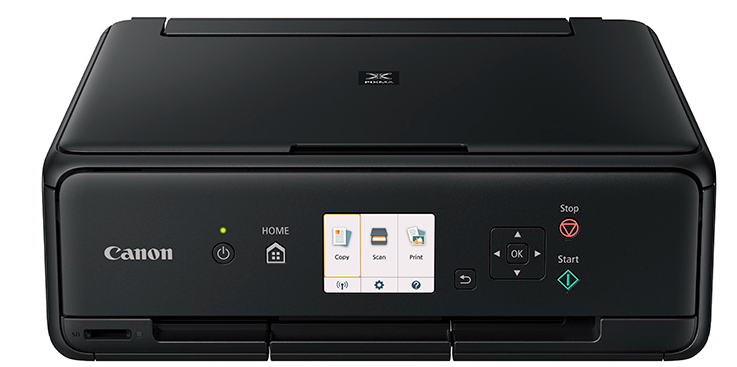
Small and Slim Design
The Canon PIXMA TS5040 has an extremely slim shape, being approximately 40% smaller than its predecessors. The compact size enables it to be placed well within small desks or shelves without leaving your workspace cluttered or ineffective in any way and yet still does not compromise on the quality of the performance that should be delivered by a Canon device.
On top of its physical size, the printer has a high-end finish and an adjustable front panel. This ergonomic design makes the 7.5 cm (3-inch) LCD and buttons accessible to the users. It blends seamlessly into any modern home environment while providing a premium feel that enhances the user experience.
Advanced Five-Single-Ink System
Among the outstanding characteristics of the TS5040 is its special five-single-ink system. The printer is exceptionally detailed in both text and photographs by using individual cartridges of each color, with a special pigment black used to print text. This configuration will guarantee your prints are professionally contrasting and vivid.
This system is also very cost-effective since you can only change the particular color that has depleted. Rather than throwing away a cartridge in multi-color, you use all the ink. This efficiency saves a lot of waste and it also saves a lot of money on printing in the long term, which is why it is a good option to use by frequent users.
Wireless Networking and Cloud-based Printing
The TS5040 is designed to be mobile-friendly with an easy-to-use Wi-Fi connection that enables you to print anywhere in your house. It supports Apple AirPrint, Mopria and Canon PRINT app, which allows you to easily transfer photos with your smartphone or tablet without a computer.
Moreover, the PIXMA Cloud Link can be used to print content directly off of popular social networks and cloud storage applications, such as Instagram, Facebook, and Google drive. This is flexibility, because you can instantly turn your digital memories into hardcopy prints, so everyone can have a truly connected and modern printing workflow.
High-Resolution Photo Printing
The TS5040 will also be popular with photography fans because of its capability to make breathtaking 10×15 cm (4×6 inch) photos without any borders in a matter of 39 seconds. The device has a print resolution of up to 4800 dpi, which captures complex details and gradations, making each image appear true-to-life and vivid on quality photo paper.
The printer can also print square media, ideal when it comes to printing photos in a social media format. Such artistic flexibility will enable you to experiment with formats and layouts. Be it designing a physical scrapbook or an individualized gift, the high-resolution printout will help your creative projects to appear clean and professionally completed.
Intuitive User Interface
The Canon PIXMA TS5040 has a large LCD of 7.5 cm (3-inch) that makes it easy to navigate the many functions. The interface is made clear with straightforward icons and rational menu structure that makes it easy to navigate through the printing, scanning and copying operations with little effort.
This is an easy user interface that is also applied to the physical controls that are user responsive and conveniently placed. It will be simple to make adjustments or carry out maintenance tasks even to users not tech-savvy. This ease of accessibility will mean that you will not spend as much time troubleshooting and more time enjoying what the printer has to offer.
Inbuilt SD Card Slot
The TS5040 has an in-built SD card slot, which is easily accessible (and is on the front of the machine) to those who want to take a more direct and simple method. This enables you to direct the printing of images without a PC or a wireless connection to your camera and it provides a quicker way to print the images through the memory card of the camera.
All you need to do is insert your card, choose your favorite pictures on the LCD display, and press print. This is a major advantage especially when one wants to proofread shots in a short time or share photos with friends right after an incidence. It brings an added convenience to an already multipurpose and extremely capable home printing device.
Function of the Canon PIXMA TS5040 Resetter

Canon PIXMA TS5040 Resetter is a necessary tool to control the internal “Waste Ink Pad” counter. As time goes by, a printer ends up collecting too much ink in cleaning processes and the system finally locks itself out to avoid actual overflow. The resetter software clears this digital error and the printer can run.
The printer will eventually get into a Service Requirement state and cease to operate without a resetter. This is a hardware lockout regardless of the state of the printer otherwise being in ideal condition. Reprogramming the internal logic not only prolongs the life of your hardware, but also saves you the cost of unnecessary professional repair services, which are very costly.
Download Canon PIXMA TS5040 Resetter for Windows
Finally, to keep Canon PIXMA TS5040 in good condition, one will need not only ink and paper but also the appropriate software to override the inner maintenance restrictions. The best method to make sure your printer is still in operation once it has reached the limit of the programmable use is by using a resetter that offers a long-lasting and affordable solution.
Finally, the presence of a resetter will enable you to assume complete control of the maintenance of your device. It eliminates the disease of unintended nonfunction and it means that you can keep on printing quality prints without the hitch of software-enforced restrictions, which is why it is an essential component in your printing arsenal. You can click the link below to Download PIXMA TS5040 Resetter for Windows:
- App Name Canon PIXMA TS5040 Resetter
- License Freeware
- Publisher Canon Inc
- Updated Apr 19, 2026
- Version 63102
Anturis.com is your trusted source for software downloads.


























Leave a Comment