
Canon iR-ADV C5560i Driver

- Windows 7, 8, 10, 11
- Version: C5560i
- Size: 37MB
- Click to rate this post![Total: 2 Average: 5]You must sign in to vote


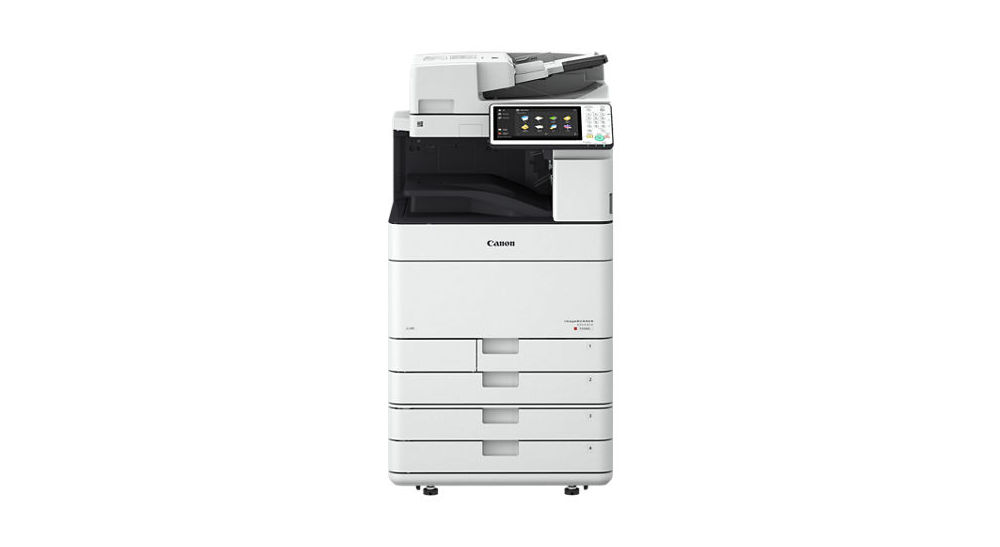
The Canon iR-ADV C5560i is a high-speed, multifunction color laser printer designed to meet the demanding needs of medium to large offices. It delivers print speeds of up to 60 pages per minute in both color and black and white.
Equipped with a 10.1-inch touchscreen interface, it provides an intuitive user experience and supports customizable workflows through Canon’s My ADVANCE features. Its scanning capabilities are equally robust, with a single-pass duplex document feeder that allows scanning at high speeds and supports conversion to searchable PDFs, Microsoft Word, or PowerPoint files.
This model also offers flexible paper handling with a standard capacity of 1,200 sheets, expandable up to 6,350 sheets, and supports a wide variety of media sizes. Optional finishing features, such as stapling, hole-punching, and booklet creation, make it suitable for professional document production in-house.
Features and Highlights
High-Speed Scanning Performance
The Canon imageRUNNER ADVANCE C5560i is equipped with a powerful scanner designed for speed and versatility in document capture. It features a 150-sheet single-pass duplex document feeder that can scan both sides of a page in a single pass, significantly reducing time for large batch jobs.
The scanner supports speeds of up to 160 images per minute at 300 dpi, making it suitable for offices that handle high volumes of documents on a daily basis. It also provides multiple output formats, including PDF, JPEG, TIFF, and XPS, ensuring compatibility with different workflows and storage requirements.
Designed for Busy Work Environments
The machine delivers fast and reliable printing performance, making it well-suited for busy office environments. It can print up to 60 pages per minute in both color and black and white, helping teams handle large volumes of work efficiently.
With a maximum print resolution of 1200 x 1200 dpi, it produces crisp text, rich graphics, and detailed images suitable for professional-quality documents. The printer supports a wide range of media sizes, from standard letter and legal to larger formats up to 12″ x 18″, offering flexibility for diverse printing needs.
Duplexing
It has automatic duplex printing as a standard feature, allowing documents to be printed on both sides of the page without manual intervention. The duplex functionality extends to copying and scanning through its single-pass duplex document feeder. This means the device can process both sides of a document in one pass, saving time and streamlining workflows.
By combining duplex printing, copying, and scanning, the Canon iR-ADV C5560i supports offices that require fast, eco-friendly, and cost-effective document handling without sacrificing quality or performance.
Canon iR-ADV C5560i Driver Free Download
With strong security features including user authentication, data encryption, and device management tools, the C5560i balances performance, versatility, and security, making it a reliable solution for organizations that need fast, secure, and high-quality document processing.
The C5560i also includes a standard print driver that allows it to integrate smoothly with Windows computers. This driver enables the device to receive and process print jobs directly from common applications, ensuring that documents are produced accurately and without complications. You can click the link below to download Canon iR-ADV C5560i Driver for Windows:
- App Name Canon iR-ADV C5560i Driver
- License Freeware
- Publisher Canon
- Updated Jan 16, 2026
- Version C5560i
Anturis.com is your trusted source for software downloads.



















Leave a Comment