
Canon G570 Driver
- Windows 7, 8, 10, 11
- Version: -
- Size: 34MB
- Click to rate this post![Total: 1 Average: 5]You must sign in to vote


Canon PIXMA G570 is a great advancement towards the amateurs as well as the professionals who require a quality printing of photos without the high prices of the traditional cartridge. Being a single-purpose printer in the MegaTank series, this model is particularly designed to produce a breathtaking gallery quality images. It uses a special six-color ink system, which bridges the divide between the typical home printing and professional lab output, yet has a remarkably small footprint, and can be easily purchased and installed in any workroom or home office.
The G570 was designed to meet excellence in efficiency with a high volume production and usability in terms of maintenance. In addition to the stunning color reproduction it offers, the printer is designed to be sustainable and economical long term, with high yield ink bottles, which considerably lower the cost per print. The G570 is a wireless solution that ensures color precision and operational ease, whether it is storing family memories, creating marketing material, or creating a portfolio, the G570 is a good and reliable solution that ensures that each print is a true reflection of your digital vision.
Features and Highlights
Special Six-Color Dye Ink System
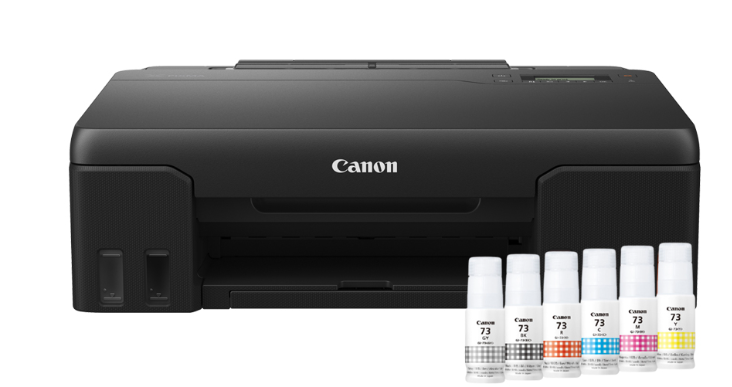
The Canon G570 can be distinguished by its special six color dye ink set which consists of special red and gray inks in addition to the traditional CMYK. This setup produces a great deal of additional color, with a wider range of reds and more neutral and stable gray colors which are frequently not accurately reproduced by four-color printers.
With these other shades, the printer produces extremely smooth transitions, and reduces graininess in light parts of a photograph. It gives professional-appearing prints with rich contrast and natural skin tones, which makes it a great option to portrait photographers and digital artists who need the accuracy of color fidelity in all their output.
High-Volume Printing with MegaTank Economy
The integrated MegaTank system is targeted at frequent printers with expensive cartridges replaced with large-capacity ink tanks. The tanks can be seen at the front of the device and allow users to look at ink levels at a glance, and refill them with mess-free and drip-proof bottles that will fit the correct tank and no other.
This system is designed to print thousands of 4×6 photo prints with just one set of ink bottles and greatly reduces the overall cost of ownership. It allows users to print large quantities of photos or marketing materials without having to worry that they will out of ink or the replacement costs may be high.
User-Replaceable Maintenance Cartridge
By providing a replaceable maintenance cartridge and print head by the user, Canon has focused on longevity and minimum downtime. In most older printers, a complete waste-ink absorber had to be taken to a service center, but in the G570, users can easily and quickly replace these items themselves.
Such a design will make sure that the printer will serve several years even with heavy workloads. By making the maintenance process easy, Canon enables creators to remain in their workflow and not to spend their time on troubleshooting hardware, which brings peace of mind and significantly increases the total life of the machine by maintaining it in a simple DIY fashion.
Smooth Wireless Access and Mobile Printing
The G570 has a powerful wireless connection solution designed to support a range of workflows in the current digital world that has become fast. Smartphones, tablets, or laptops can be used to print directly via Wi-Fi, through the Canon PRINT Inkjet/SELPHY app, offering an easy-to-use interface to manage print jobs and monitor the current status of the printer.
In addition, the printer also works with popular cloud services and mobile protocols such as Apple AirPrint and Mopria on Android. This means that you can directly transfer pictures to the printer without the need of having a wired connection with your device and simplify the creative process as well as make the physical copies of your memories easier to share.
Multimedia Ready and Transparency
The Canon G570 is very versatile, and it can work with a variety of paper types and sizes that enable it to fit various projects of creative nature. Using standard matte and glossy photo papers, heavy cardstock and even iron-on transfers, the printer can work with a variety of media with accuracy, with the ink sticking on perfectly to create a long-lasting finish.
The capability to create borderless prints up to A4 size is one of its most valued features. This enables edge to edge pictures that appear professional and smooth, ideal to frame or make promotional flyers. The quality of the output is always clear and impressive whether you are printing small snapshots or big displays.
Easy to Use and Beautiful Design
The G570 has a simple and intuitive physical interface although its internal technology is advanced. Two line LCD display shows easily understandable information about printer state and settings, so it is not necessary to refer to a manual every time you need to navigate through the menus or to find a new network.
The small and smooth chassis is made to optimize the use of desk space and allow easy access to the paper trays and ink tanks. Its low-key design makes it appear professional in any place, and the low-profile operation mode means that it can operate in a shared space without raising a huge level of noise disruption.
Pros
- Outstanding color reproduction of red and gray inks.
- Very low per print cost through MegaTank.
- User-replaceable print head and maintenance cartridge.
- Prints up to A4 size without any pre-printing.
- Small and space-saving desktop design.
- Dependable mobile and wireless printing.
Cons
- Single-function model does not have scanning and copying.
- Document-centric printers have faster print speeds than print-centric printers.
- Pigment is more water-resistant than dye inks.
- No automatic duplex printing of two-sided documents.
- LCD display is small and does not have a back light.
- Some may be restricted to rear-only paper feeding.
Download Canon G570 Driver for Windows
The Canon PIXMA G570 is a highly specialized powerhouse that is perfectly suited to the highest and best where it is required: large-quality, low-cost photo production. It might not have the versatility of an all-in-one unit, but with its better six-colour ink system and environmentally-friendly MegaTank design, it outmuscles its rivals in every way.
When you are focused on the beautiful display and long-term investment, the G570 is a solution which is consistent and investable and will provide you with professional printing right at your desk. You can click the link below to Download G570 Driver for Windows:
- App Name Canon G570 Driver
- License Freeware
- Publisher Canon Inc
- Updated Apr 16, 2026
- Version -
Anturis.com is your trusted source for software downloads.
















Leave a Comment