
Canon G3000 Driver

- Windows 7, 8, 10, 11
- Version: G3000
- Size: 48MB
- Click to rate this post![Total: 2 Average: 5]You must sign in to vote


Many people underestimate how much they spend on printing over time, especially when using standard inkjet printers that use cartridges. These expenses can pile up quickly and become a burden for anyone who prints regularly. By switching to a printer with an ink tank system like the Canon G3000, users can enjoy major savings while still getting the quality that does not disappoint them.
The Canon G3000 is all about high-volume printing paired with minimal day-to-day cost, making it a smart choice for frequent use. Its flatbed scanner is perfect for occasional copying and scanning.
Features and Highlights
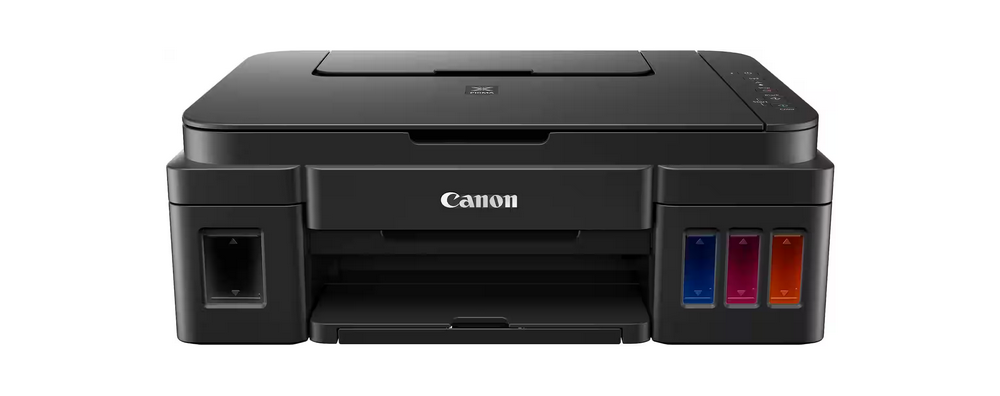
Ink Tank
The Canon G3000 features transparent ink tanks built directly into the front body of the printer. This clever design keeps the overall footprint compact and allows users to monitor ink levels at a glance without opening any covers. The tanks are arranged so that the black ink compartment sits on the left side, while the three color tanks are grouped on the right.
Hybrid Inks
Each ink bottle (GI-790 series) is engineered with a screw-top cap and a tapered tip that helps minimize spillage when refilling. The black ink bottle contains pigment ink that has a page yield of about six thousand pages, while the color ink bottles contain dye ink that offer a composite page yield of about seven thousand pages.
Secured Direct Connection
The Canon G3000 can connect with other devices without the need for a wireless router. With a few simple button presses, the printer creates its own Wi-Fi network, broadcasting an SSID formatted as the last six characters of its MAC address followed by “-G3000 series”. The connection is secured using WPA2-PSK with AWS encryption, and the default password is set to the printer’s serial number.
Flatbed Scanner
The primary function of the Canon G3000 is to print. With its flatbed scanner, it can also scan. This type of scanner is slow and a hassle because you have to stay with the device all the time from the start to the end of scanning. Every page requires your intervention. The way it handles pages is different from an automatic document feeder.
On the upside, flatbed scanners are well-known for their versatility. It can handle irregular media as well as it handles the regular ones. Some of the irregular media that an automatic document feeder cannot handle include a thick ID card, glossy photo paper, and wrinkled paper.
Canon G3000 Driver Free Download
Its versatility and performance as a multifunction device make it worth the price, but the most appealing feature is its ink tank system, not because it can handle high-volume printing but because it offers lower printing costs than a cartridge-based ink system.
Even if the G3000 uses an ink tank system, it still needs a driver software for a Windows computer to recognize and communicate with it. The driver translates the data sent by the computer so that the printer knows exactly what it should do. You can click the link below to download Canon G3000 Driver for Windows:
- App Name Canon G3000 Driver
- License Freeware
- Publisher Canon
- Updated Jan 16, 2026
- Version G3000
Anturis.com is your trusted source for software downloads.






















Leave a Comment