
Canon G3010 Driver

- Windows 7, 8, 10, 11
- Version: G3010
- Size: 20MB
- Click to rate this post![Total: 1 Average: 5]You must sign in to vote


It’s easy to overlook how much you’re spending on printing when using a typical inkjet printer with cartridges. These costs add up quickly and can weigh heavily on anyone who prints frequently. Opting for a printer like the Canon G3010, which features an ink tank system, can save you a surprising amount of money without sacrificing print quality.
The Canon G3010 is made for people who print a lot and don’t want to feel like they’re constantly bleeding money on ink. It offers a reliable and affordable way to handle high-volume tasks without making daily printing feel like a financial chore.
Features and Highlights
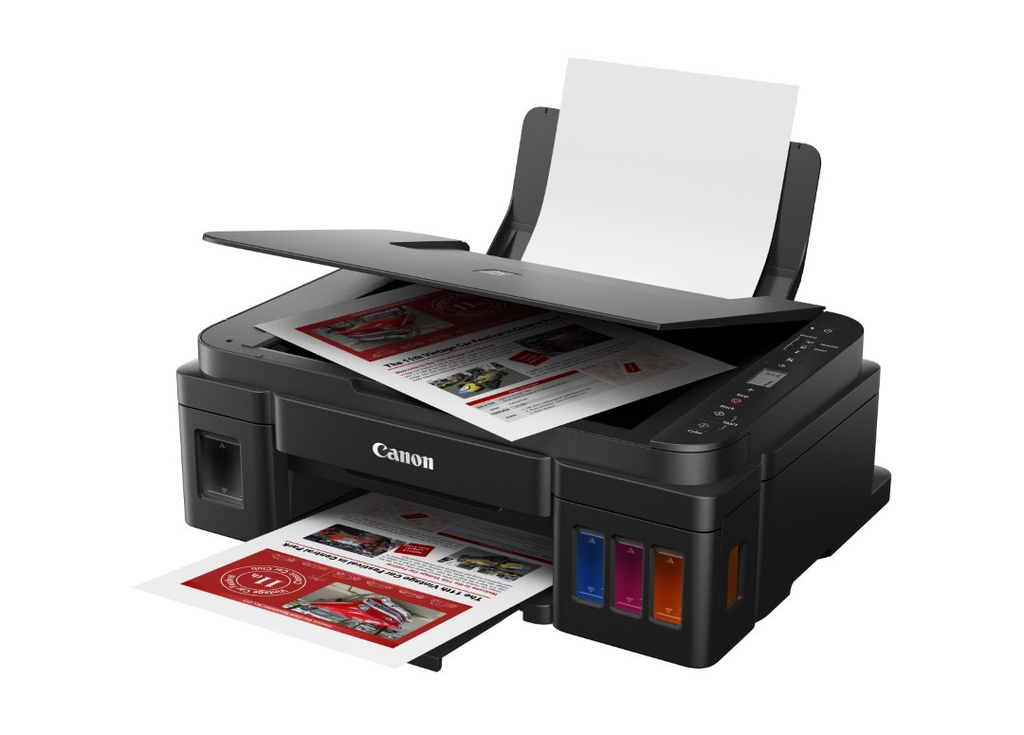
Refillable Ink Tanks
The G3010 takes a streamline approach by placing its transparent ink tanks on the front instead of attaching them to the side, giving you an instant view of ink levels without the hassle of lifting covers or flipping panels or turning on the computer.
The black ink tank, which is larger than the rest, is placed on the left side. The others (cyan, magenta, and yellow) are neatly arranged on the right side. Each of them can be refilled easily.
Dye and Pigment Inks
To achieve the best results, the Canon G3010 uses a hybrid ink approach. Instead of using only dye-based inks, it uses a pigment black ink. The black ink bottle GI-790, which can also be used to refill the Canon G3000, can produce up to six thousand monochrome pages. The dye-based color inks last through about 7000 color pages.
Access Point Mode
This mode enables direct wireless printing without relying on a router, which is greatly helpful when the Wi-Fi network has some issues that make it unavailable temporarily. It only takes a few steps to enable this mode. After that, the printer’s access point name (SSID) will appear as “XXXXXX-G3010 series,” where “XXXXXX” represents the last six digits of the printer’s MAC address. The default password for this connection can be found on the rear of the device. Five devices can connect to the printer at the same time in this mode.
Flatbed for Everyday Scanning
The flatbed scanner is not built to handle multi-page documents. You can still use it to scan them, but it will be a chore. That kind of task is best handled by the help of an automatic document feeder. The flatbed’s strength lies in its ability to scan paper in various shapes and minimize the risk of damaging fragile paper.
Canon G3010 Driver Free Download
The Canon G3010 does a solid job as a multifunction device, but the one feature that justifies the initial price the most is the ink tank system simply because it can save users more money over time as they keep printing pages.
Even if the G3010 comes with an ink tank approach to manage ink, you still need a driver software for Windows to make it work. That driver is what tells the 3-in-1 printer exactly what the computer wants. You can click the link below to download Canon G3010 Driver for Windows:
- App Name Canon G3010 Driver
- License Freeware
- Publisher Canon
- Updated Mar 28, 2026
- Version G3010
Anturis.com is your trusted source for software downloads.




















Leave a Comment