
Samsung Xpress SL-M2070FW Laser Driver
- Windows 7, 8, 10, 11
- Version: SL-M2070FW
- Size: 38MB
- Click to rate this post![Total: 2 Average: 5]You must sign in to vote


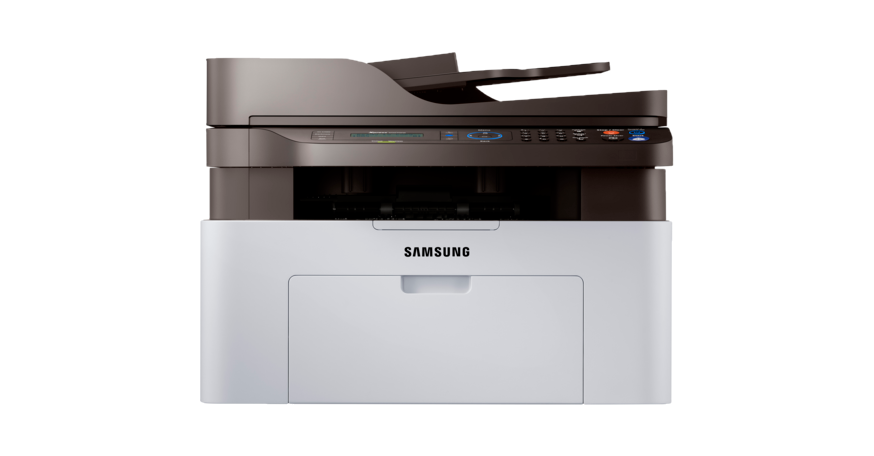
The Samsung Xpress SL-M2070FW Laser is an all-in-one (AIO) device built for printing, copying, scanning, and faxing in small offices. It has a 2-line LCD screen that displays up to 16 characters per line, 600MHz processor, wireless and Ethernet connectivity options, 128MB memory, and an automatic document feeder.
The maximum number of pages it can print is set to ten thousand pages per month. It’s not a hard limit, but it’s a safe limit. If you print more (e.g., 11,000 pages in a month), the risk of failure becomes noticeably higher. If you want the machine’s performance to stay on top for as long as possible, you should print between 100 to 1,500 pages each month.
Features and Highlights
Scan One or Many Pages
If you need to scan only one page, or scan something that would likely get damaged if you aren’t careful, you can use the flatbed scanner. Its efficiency at scanning is inferior to the automatic document feeder (ADF), but it excels when it comes to versatility.
If there are many pages to scan, you can depend on the ADF to finish the job. Its tray allows you to drop up to 40 sheets of paper, which is a capacity that’s slightly above average. It’s still low, but it reduces the hassle of manually placing the sheets one at a time as you would with the flatbed.
Cut Your Printing Costs
Printing is not cheap. In addition to the toner costs, which are by far the highest, there are still electricity and paper costs that you’ll need to deal with as you keep printing. Fortunately, the Samsung Xpress SL-M2070FW Laser offers some options to help you save on printing costs such as Eco feature and manual duplexing. Also, the machine automatically reduces power consumption when it is idle.
Nothing but Black
Documents are rarely printed in color. Some users even always print in black, so it’s not surprising that monochrome printers are made, like the Samsung Xpress SL-M2070FW Laser. It’s more budget-friendly than comparable color printers simply because it ditches color toner cartridges.
Samsung Xpress SL-M2070FW Laser Driver Free Download
With its ability to print, scan, copy, and fax, it ensures that essential office tasks are streamlined in one compact machine. Its wireless printing capability makes it easy to connect with a variety of devices, enabling smooth operation for individuals who need quick and dependable results. The printer’s smart features support productivity by combining user-friendly controls with consistent output quality.
For home offices as well as small businesses, the Samsung Xpress SL-M2070FW Laser represents a balance between performance and practicality. It provides the versatility to handle multiple tasks while maintaining sharp text and clear graphics across documents.
By integrating key functions into a single device, it reduces the need for multiple machines, helping to save space and resources. This combination of speed, quality, and connectivity makes it a strong option for those seeking an all-in-one solution for their daily printing needs. You can click the link below to download Samsung Xpress SL-M2070FW Laser Driver for Windows:
- App Name Samsung Xpress SL-M2070FW Laser Driver
- License Freeware
- Publisher Samsung
- Updated Jan 16, 2026
- Version SL-M2070FW
Anturis.com is your trusted source for software downloads.
















Leave a Comment